
If you have ever wondered how does IPTV work, the answer is simpler than it may seem. Instead of delivering television programmes through traditional aerials, satellite dishes, or cable networks, IPTV uses an internet connection to stream television content directly to your device.
IPTV has become increasingly popular because it can provide live TV channels, films, TV series, sports and other on-demand content through internet-connected devices. But how does the technology actually work, and what do you need to start watching?
In this beginner-friendly guide, we will explain how IPTV works step by step, the technology behind IPTV streaming, the devices you can use, the internet speed you need, and the main advantages and disadvantages.
What Is IPTV?
IPTV stands for Internet Protocol Television. It is a method of delivering television content using an IP network, usually the internet, rather than traditional broadcast technologies.
With conventional television, content may be transmitted through:
- Satellite signals
- Cable networks
- Terrestrial broadcasting
- Aerial signals
With IPTV, video content is delivered as digital data over an internet or IP network.
This means you can potentially watch television through devices such as:
- Smart TVs
- Amazon Fire TV devices
- Android TV boxes
- Smartphones
- Tablets
- Computers
- Compatible streaming devices
However, IPTV is not simply the same as watching a normal video on YouTube. IPTV platforms can use specialised systems to manage live channels, video-on-demand libraries, user accounts, playlists and streaming servers.
How Does IPTV Work?
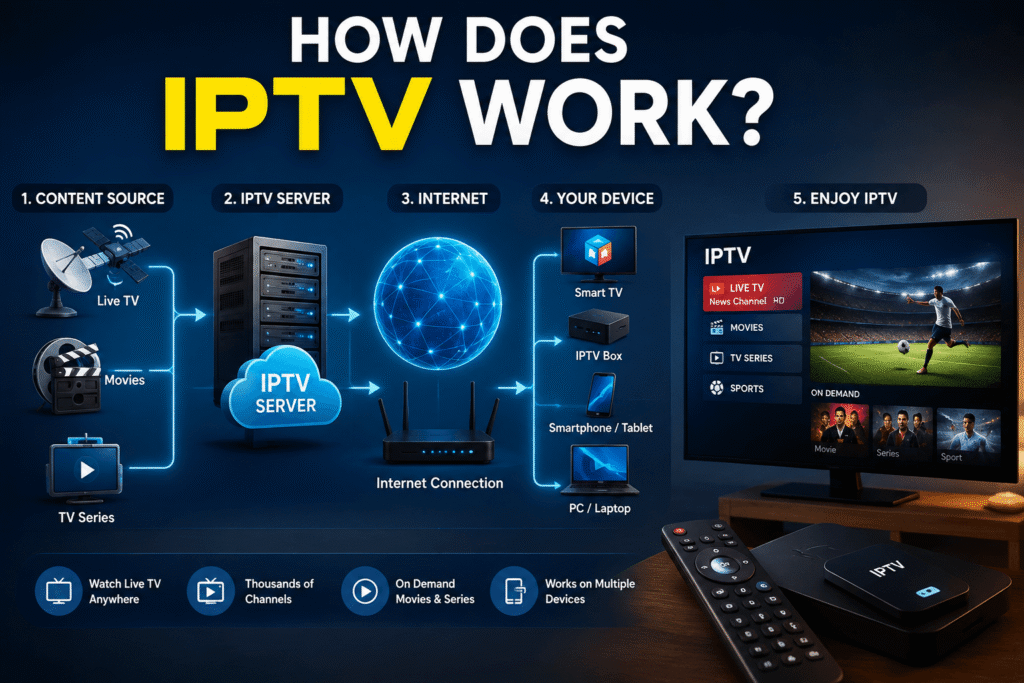
So, how does IPTV work exactly?
The process can be divided into several main stages:
- Content is acquired by an IPTV provider.
- The content is processed and encoded into digital formats.
- The video is stored or prepared on streaming servers.
- The IPTV platform manages channels and programmes.
- Your IPTV application requests the selected content.
- The server sends the video data through an IP network.
- Your device receives and decodes the stream.
- The video appears on your screen.
In simple terms, IPTV works by sending television content as packets of data over an IP network.
Step 1: Content Acquisition
An IPTV service first needs access to the content it wants to distribute.
Depending on the service, this could include:
- Live television channels
- Films
- TV programmes
- Sports events
- News
- Documentaries
- On-demand videos
Legitimate IPTV providers must have the appropriate rights and licences to distribute the content they offer.
Step 2: Video Encoding
Raw video requires a large amount of data. Streaming it directly would consume enormous bandwidth.
Therefore, video is encoded and compressed using modern video codecs. Compression reduces the amount of data required while maintaining suitable picture quality.
Common video formats and technologies include:
- H.264/AVC
- H.265/HEVC
- MPEG-based technologies
- Modern adaptive streaming formats
The exact technology depends on the IPTV platform and its infrastructure.
Step 3: Streaming Servers
After encoding, content is delivered through servers designed to handle streaming requests.
When you select a channel, your device communicates with the IPTV service and requests the relevant stream.
The server then begins delivering video data to your device.
Large streaming platforms may use distributed infrastructure and content delivery networks to reduce latency and improve reliability.
Step 4: IPTV App or Player
You normally need an IPTV-compatible application or player to access the stream.
The application acts as the interface between you and the streaming service.
Depending on the provider and device, you may receive access through:
- An IPTV application
- A dedicated provider application
- A web player
- An M3U playlist
- An authorised API-based service
The player processes the incoming stream and displays the video.
What Happens When You Press Play?
Imagine that you open an IPTV application and select a live sports channel.
Several things happen very quickly:
You select a channel → the app sends a request → the streaming server responds → video data travels through the network → your device buffers and decodes the stream → you see the programme.
This entire process can happen within seconds.
The quality of your experience depends on several factors, including your internet connection, the streaming server, network congestion, device performance and video quality.
IPTV vs Traditional Television
One of the easiest ways to understand IPTV is to compare it with traditional television.
| Feature | IPTV | Satellite TV | Traditional Cable |
|---|---|---|---|
| Main delivery method | IP network | Satellite signal | Cable network |
| Internet required | Usually yes | No | Usually no |
| Dish required | No | Usually yes | No |
| On-demand content | Often available | Provider dependent | Provider dependent |
| Device flexibility | High | More limited | Moderate |
| Mobile viewing | Often possible | Limited | Limited |
IPTV’s major advantage is flexibility. Because content is delivered through IP networks, it can potentially be accessed across multiple internet-connected devices.
What Do You Need to Watch IPTV?
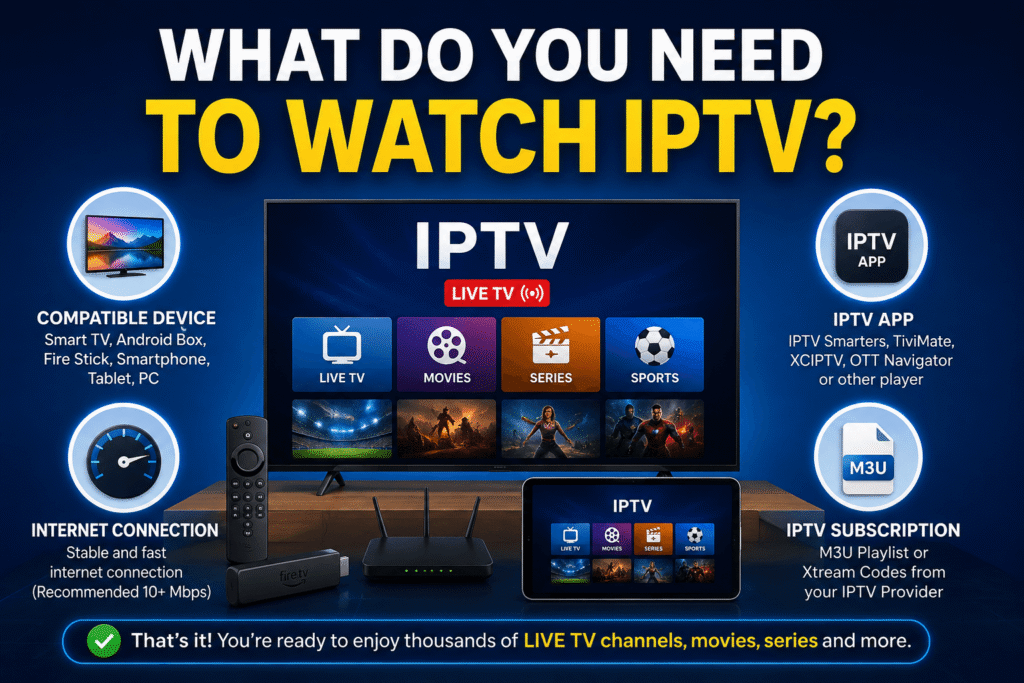
Getting started with a legitimate IPTV service usually requires four basic things.
1. A Reliable Internet Connection
Because IPTV is delivered over a network, your connection plays an important role.
A slow or unstable connection can cause:
- Buffering
- Video quality drops
- Freezing
- Connection interruptions
2. A Compatible Device
You can use a wide range of devices, depending on the service.
For example:
- Smart TV
- Fire TV device
- Android TV
- Smartphone
- Tablet
- Computer
3. An IPTV Service
You need a legitimate IPTV provider that offers the channels or content you want to watch.
Always check whether the service has the necessary rights to distribute its content in your country.
4. An IPTV Player or Official App
Some providers offer their own application. Others may support compatible third-party players.
The safest option is to follow the provider’s official setup instructions and download applications from trusted sources.
What Internet Speed Does IPTV Need?
There is no single internet speed that guarantees perfect IPTV performance because quality also depends on the provider and your network.
As a general guide:
- SD: around 3–5 Mbps
- HD: around 5–10 Mbps
- Full HD: around 10 Mbps or more
- 4K: often 25 Mbps or more
These are practical estimates rather than strict requirements.
If several people are using the same internet connection at the same time, you may need considerably more bandwidth.
For example, someone streaming 4K video while another person is gaming and a third person is downloading large files could experience congestion even with a relatively fast connection.
What Is IPTV Buffering?
Buffering occurs when your device does not receive enough video data quickly enough to continue playback smoothly.
There are several possible causes.
Slow Internet
A connection that cannot consistently provide enough bandwidth can result in buffering.
Wi-Fi Problems
Distance from your router, walls, interference and network congestion can reduce Wi-Fi performance.
Server Overload
If an IPTV provider’s streaming infrastructure is overloaded, users may experience interruptions even when their own internet connection is fast.
Network Congestion
Internet traffic can become heavier during peak periods, potentially affecting streaming performance.
Device Limitations
Older or underpowered devices may struggle with high-resolution streams.
How to Reduce IPTV Buffering
If your IPTV stream keeps buffering, try these steps:
- Test your internet speed.
- Restart your router.
- Move closer to the Wi-Fi router.
- Use Ethernet where possible.
- Reduce the streaming resolution.
- Close applications using bandwidth.
- Restart your streaming device.
- Check whether other services work normally.
- Contact your IPTV provider if the problem appears to be server-related.
Ethernet is often preferable to Wi-Fi for a fixed Smart TV or streaming box because it can provide a more stable connection.
What Is an M3U Playlist?
You may encounter the term M3U playlist when learning how IPTV works.
An M3U file or playlist is commonly used to organise media stream information. In IPTV environments, it can contain references to channels or streams that an authorised service provides.
Instead of manually entering every channel, a compatible player can load the playlist and display the available content.
The important point is that the playlist itself does not automatically make content legal. The underlying streams still need to be properly authorised.
What Are Xtream Codes?
Some IPTV platforms use API-based login systems often referred to as Xtream Codes.
Typically, a provider may give a customer information such as:
- Server address
- Username
- Password
A compatible application can use those details to retrieve channel and programme information from the provider’s service.
Again, the legality depends on whether the provider has the necessary rights to distribute the content.
Is IPTV Legal?
IPTV technology itself is legal.
The important issue is the content being distributed and whether the provider has permission to distribute it.
Legitimate examples include:
- Official broadcaster streaming services
- Licensed television platforms
- Subscription streaming services
- Internet television services with distribution rights
Problems arise when services distribute copyrighted channels, films or sports without permission.
Before subscribing to an IPTV service, check:
- Who operates the service
- What content it provides
- Whether it has distribution rights
- Whether its terms and conditions are clear
- Whether payment and customer support information are transparent
Avoid services that make unrealistic promises, such as thousands of premium channels for an unusually low price, without explaining their licensing arrangements.
Advantages of IPTV
IPTV offers several potential benefits.
Flexible Viewing
You can watch content on many different compatible devices.
On-Demand Content
Many IPTV platforms combine live television with on-demand libraries.
Interactive Features
IP-based services can support features such as electronic programme guides, catch-up television and personalised recommendations.
No Satellite Dish
Depending on the service, you may not need a satellite dish or traditional television antenna.
Multi-Device Access
Some services allow subscribers to access content across multiple supported devices, subject to their terms.
Disadvantages of IPTV
IPTV is not perfect.
Internet Dependency
If your internet connection goes down, your IPTV service may stop working.
Buffering
Poor network performance or overloaded servers can affect playback.
Variable Quality
Not all IPTV providers have the same infrastructure or streaming quality.
Legal Risks With Unauthorised Services
Using unlicensed services to access copyrighted content can create legal and security problems.
Privacy and Security Concerns
Unknown IPTV applications or websites can expose users to malware, aggressive advertising or data-collection risks.
IPTV for Smart TVs
Smart TVs are one of the most convenient ways to watch IPTV.
Depending on your television model and operating system, you may be able to install an official IPTV application directly from the TV’s app store.
The general process is:
- Connect your Smart TV to the internet.
- Open its official application store.
- Search for the provider’s authorised application.
- Install the application.
- Sign in using your subscription details.
- Select your content and start watching.
The exact process varies between Samsung, LG, Android TV, Google TV and other platforms.
IPTV on Fire TV Devices
Fire TV devices can also provide a convenient streaming experience when the relevant application is supported.
The best approach is to use applications from trusted sources and follow the IPTV provider’s official installation instructions.
Before installing an unfamiliar application, check its developer, reviews and permissions.
Is IPTV Better Than Cable or Satellite?
There is no universal answer.
IPTV may be better for people who value flexibility, internet-based access and on-demand features.
Satellite television may be more suitable where internet connectivity is unreliable.
Cable television can still be attractive where providers offer bundled services and reliable infrastructure.
The best choice depends on:
- Your internet connection
- Your location
- Your budget
- The channels you want
- Your preferred devices
- Whether you need on-demand content
How to Choose a Good IPTV Service
If you are considering an IPTV subscription, do not choose a provider based only on the number of channels.
Look for:
- Clear licensing information
- Reliable streaming infrastructure
- Transparent pricing
- Good customer support
- Compatible devices
- Clear cancellation terms
- Secure payment options
- Positive independent reviews
A smaller, legitimate service with reliable streaming can be much better than a suspicious service advertising an enormous channel list.
Frequently Asked Questions
How does IPTV work?
IPTV delivers television content as digital data through an IP network. Your IPTV application requests a stream from a server, receives the video data and decodes it so you can watch the programme on your device.
Does IPTV require internet?
Most consumer IPTV services require an internet connection because the television content is delivered through an IP network. The required speed depends on video quality and how many devices are using your connection.
Can I watch IPTV on a Smart TV?
Yes. Many Smart TVs support IPTV applications or official streaming services. Compatibility depends on the television’s operating system and the provider’s application.
What is the difference between IPTV and streaming?
IPTV is a form of television delivery using IP networks. Streaming is a broader technology used to deliver audio and video over networks. IPTV can use streaming technology to deliver live and on-demand television.
Is IPTV legal?
IPTV technology is legal. However, a particular IPTV service may not be legal if it distributes copyrighted content without the required permission or licences.
Why does IPTV keep buffering?
Buffering can result from slow or unstable internet, Wi-Fi interference, network congestion, overloaded streaming servers or device limitations.
Can IPTV work with Wi-Fi?
Yes. IPTV can work over Wi-Fi if the wireless connection is sufficiently fast and stable. For the most reliable experience, Ethernet may be preferable for stationary devices.