
Finding the best IPTV player UK users can rely on doesn’t have to be complicated. Whether you want to watch live TV, films, series or other content through a legitimate IPTV service, choosing the right player can make a huge difference to your viewing experience.
An IPTV player is the app or software that plays IPTV streams. It normally does not provide TV channels itself. Instead, you add a playlist or login details from your IPTV provider and use the player to access content.
But with so many apps available for Smart TVs, Fire TV devices, Android TV, Apple TV and mobile phones, which one should you choose?
In this guide, we’ll compare popular IPTV players, explain what features matter most and help you find the right option for your device and needs.
What Is an IPTV Player?
An IPTV player is an application designed to play television and video streams delivered over the internet.
Unlike traditional terrestrial, satellite or cable television, IPTV uses an internet connection to deliver content. The player acts as the interface between your device and a compatible IPTV service.
A typical IPTV player may support:
- Live TV channels
- Electronic Programme Guides (EPG)
- Video-on-demand libraries
- M3U playlists
- Xtream Codes API
- Catch-up TV
- Multiple playlists
- Subtitles
- Favourites
- Parental controls
- Recording on supported devices
It’s important to understand the difference between an IPTV player and an IPTV provider. A player generally doesn’t supply channels or subscriptions. You need to use a service that has the appropriate rights to distribute its content.
How to Choose the Best IPTV Player UK Users Need
Before installing an IPTV application, consider how you actually watch television.
The best IPTV player UK users choose should be easy to navigate, compatible with their device and capable of handling their preferred streaming format.
1. Device compatibility
First, check whether the player works on your device.
Popular platforms include:
- Amazon Fire TV and Fire Stick
- Android TV
- Google TV
- Samsung Smart TV
- LG Smart TV
- Apple TV
- Android smartphones and tablets
- iPhone and iPad
- Windows PCs
Not every IPTV app is available on every platform, so compatibility should always be checked before installation.
2. EPG support
An Electronic Programme Guide can make live television much easier to use.
Instead of scrolling through channel names, an EPG can display information such as:
- Current programmes
- Upcoming programmes
- Programme descriptions
- Channel schedules
- Start and finish times
If you regularly watch live TV, good EPG support can be one of the most valuable features.
3. Simple interface
A complicated interface can quickly become frustrating, especially when you’re using a television remote.
Look for an IPTV player with:
- Clear menus
- Easy channel navigation
- Search functionality
- Favourites
- Logical categories
- Fast loading times
For beginners, simplicity is often more important than having dozens of advanced settings.
4. Streaming performance
The player should be able to handle your streams smoothly.
However, remember that buffering isn’t always caused by the player. It can also result from:
- Slow internet
- Wi-Fi interference
- Network congestion
- Poor server performance
- Overloaded IPTV infrastructure
- Insufficient device resources
For reliable streaming, a stable internet connection is essential.
7 Popular IPTV Players in the UK
There isn’t one application that is perfect for everyone. The right choice depends on your device, experience and preferred features.
1. TiviMate
TiviMate is one of the most recognised IPTV player options among Android TV and Fire TV users.
Its interface is designed primarily for large screens and remote-control navigation, making it particularly suitable for television viewing.
Popular features include:
- EPG support
- Multiple playlists
- Favourites
- Channel categories
- Customisable interface
- Catch-up support where available
- Recording on supported configurations
TiviMate is particularly appealing if you want an interface that feels similar to a traditional television platform.
Best for: Android TV and Fire TV users who want an advanced TV-style interface.
2. IPTV Smarters Player
IPTV Smarters Player is another widely used option across compatible devices.
It is designed to provide a straightforward interface for accessing compatible IPTV playlists and services.
Depending on the version and platform, features can include:
- Live TV
- Video on demand
- Series
- EPG
- Multiple profiles
- Parental controls
- Playlist management
For beginners, its familiar layout can make getting started relatively simple.
Best for: Beginners looking for a straightforward IPTV interface.
3. XCIPTV Player
XCIPTV Player is another option worth considering, particularly for Android-based devices.
The application can provide features such as an EPG, favourites and support for compatible IPTV login methods.
Its interface is designed with television users in mind, making it easier to navigate using a remote control.
Best for: Android users looking for a simple TV-focused player.
4. OTT Navigator
OTT Navigator is aimed more towards users who want additional control over their IPTV experience.
It offers various customisation options and can be useful for people managing multiple playlists.
Its more advanced approach means beginners may need some time to become familiar with the interface.
Best for: Intermediate and advanced IPTV users.
5. Smart IPTV
Smart IPTV is another name that UK Smart TV owners may encounter.
Its availability and functionality can vary depending on the television platform and region, so check the current official information for your particular device before choosing it.
Best for: Compatible Smart TV users who prefer a dedicated television application.
6. GSE Smart IPTV
GSE Smart IPTV has historically been popular with users looking for an IPTV player for mobile and other supported platforms.
It can support common playlist formats and provides various playback and organisation features.
Best for: Users who want IPTV access across compatible mobile devices.
7. VLC Media Player
VLC is different from many dedicated IPTV applications because it is a general-purpose media player.
It can play many video and streaming formats and is available on numerous platforms.
However, it doesn’t necessarily provide the same television-focused experience as dedicated IPTV applications.
Best for: PC users and people who want a versatile media player.
Best IPTV Player UK: Quick Comparison
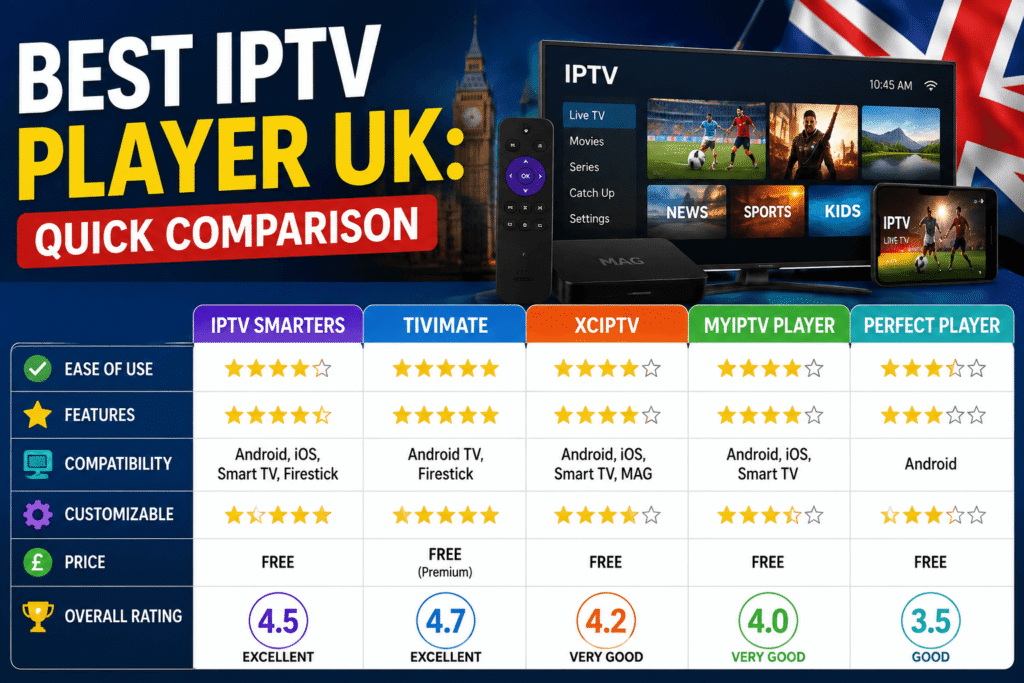
| IPTV Player | Best For | EPG | Ease of Use | Platform Focus |
|---|---|---|---|---|
| TiviMate | Advanced TV viewing | Yes | Easy–Medium | Android TV/Fire TV |
| IPTV Smarters Player | Beginners | Yes | Easy | Multiple platforms |
| XCIPTV | Android users | Yes | Easy | Android |
| OTT Navigator | Advanced users | Yes | Medium | Android |
| Smart IPTV | Smart TVs | Varies | Easy | Smart TVs |
| GSE Smart IPTV | Mobile users | Yes | Medium | Mobile |
| VLC | PC/media playback | Limited | Easy | Windows & other platforms |
Features and platform availability can change, so always check the developer’s current information before installing an application.
Which Is the Best IPTV Player UK for Fire Stick?
Amazon Fire TV and Fire Stick remain popular choices for streaming in British homes.
If you’re using a Fire Stick, consider an application that offers:
- Remote-friendly navigation
- EPG support
- Fast channel switching
- Favourites
- Multiple playlist support
- A clean interface
TiviMate is particularly attractive to users who want a television-style experience, while IPTV Smarters Player may be more approachable for beginners.
Your choice should also depend on which applications are currently available and supported on your particular Fire TV model.
Best IPTV Player UK for Smart TV
Smart TV owners have different requirements from Fire Stick users.
Samsung and LG televisions use their own operating systems, meaning Android-focused IPTV applications may not be available.
Before choosing a player, check:
- Your exact TV model.
- The TV’s operating system.
- Whether the application is officially available.
- Whether the application supports your IPTV playlist format.
- Whether the developer continues to maintain the app.
If your Smart TV has limited app support, an external streaming device can sometimes provide a wider selection of applications.
Best IPTV Player UK for Android TV
Android TV and Google TV provide greater flexibility because they support a wide range of applications.
For these devices, TiviMate, IPTV Smarters Player, XCIPTV and OTT Navigator are among the options users may consider.
If you’re new to IPTV, start with a simple application. Once you’re comfortable managing playlists and EPG information, you can move to a more advanced player if necessary.
How to Improve IPTV Streaming Quality
Even the best IPTV player UK users can install cannot compensate for every network problem.
Try these practical steps if you’re experiencing buffering:
Use a wired connection
Ethernet can provide a more stable connection than Wi-Fi, especially when your router is far from the television.
Check your internet speed
For HD streaming, a stable broadband connection is important. Higher-quality video, particularly 4K, requires significantly more bandwidth.
Restart your router
A simple router restart can sometimes resolve temporary connectivity issues.
Reduce network congestion
If several people are downloading large files, gaming online or streaming simultaneously, available bandwidth can decrease.
Keep your device updated
Install relevant system and application updates when they are available from the official developer or device manufacturer.
Test another legitimate stream
If only one channel or stream constantly buffers while others work normally, the problem may not be your IPTV player.
Is IPTV Legal in the UK?
IPTV technology itself is legal. The important issue is whether the content being streamed is properly licensed.
There are legitimate IPTV services, broadcasters and streaming platforms that deliver television over the internet.
However, accessing copyrighted channels, films, sports or other content through an unauthorised service can create legal issues.
When choosing an IPTV service, look for clear information about its licensing and content rights. Avoid providers promising huge numbers of premium channels or sports events at unrealistically low prices without explaining how the content is legally supplied.
A player does not make an unlicensed service legal.
How to Set Up an IPTV Player
Once you’ve chosen the right application, the general setup process is straightforward.
Step 1: Install the player
Download the application from an official app store or the developer’s official source where available.
Step 2: Obtain legitimate IPTV credentials
Your authorised IPTV provider may give you an M3U playlist, Xtream Codes credentials or another supported format.
Step 3: Add your playlist
Open the player and select the appropriate option for adding your playlist or account.
Step 4: Configure the EPG
If your provider supplies EPG information, add it according to the player’s instructions.
Step 5: Organise your channels
Create favourites and organise categories so you can find frequently watched content quickly.
Step 6: Start streaming
Select a channel or programme and begin watching.
The exact process varies between applications, so follow the instructions provided by the application developer and your legitimate IPTV provider.
Common IPTV Player Problems
Even a good application can occasionally experience problems.
Buffering
Usually check your internet connection, Wi-Fi signal and the stream itself.
Channels not appearing
Check that your playlist or login details are correct and that your subscription is active.
EPG not loading
The EPG URL may be incorrect, expired or temporarily unavailable.
App crashing
Restart the device and check whether an update is available. If the problem continues, reinstalling the application may help.
Poor picture quality
Check your internet connection and video source. The IPTV player cannot increase the original quality of a low-quality stream.
Frequently Asked Questions
What is the best IPTV player UK users can choose?
The best IPTV player UK users choose depends on their device and requirements. TiviMate is a strong option for Android TV and Fire TV, while IPTV Smarters Player may be easier for beginners.
Do IPTV players provide channels?
Generally, no. An IPTV player is software for playing compatible streams. You normally need a separate, legitimate IPTV service or media source.
Can I use IPTV on a Fire Stick?
Yes, compatible IPTV applications can be used on Fire TV devices. Availability depends on the application, device model and current Amazon app-store policies.
Is IPTV legal in the UK?
IPTV technology is legal. The key issue is whether the content provider has the necessary rights to distribute the content you’re watching.
Does IPTV require fast internet?
A stable broadband connection is important. Higher-resolution streams such as 4K generally require more bandwidth than standard-definition or HD streams.
Can I watch IPTV on a Smart TV?
Yes, if your television supports a compatible IPTV application or you use an external streaming device. Always check compatibility before installing an application.
Final Verdict: Choosing the Best IPTV Player UK
Choosing the best IPTV player UK users can enjoy comes down to three things: your device, the features you need and how easy you want the experience to be.
For Android TV and Fire TV users, TiviMate can be an excellent choice if you want a polished TV-style interface. IPTV Smarters Player is worth considering if simplicity is your priority, while OTT Navigator may suit more experienced users who want additional customisation.
Most importantly, remember that an IPTV player and IPTV provider are different things. Choose legitimate content sources and check that the application you install is compatible with your device.
If you’re still unsure, start with a simple player, test its interface and features, and then move to a more advanced option if your viewing needs grow.
The right player can turn a complicated IPTV setup into a much smoother and more enjoyable TV experience.