
Finding an IPTV subscription compatible with Android and iOS can make watching television on your smartphone or tablet more convenient. Whether you use an Android phone, an iPhone, an iPad or an Android tablet, the right setup can help you enjoy compatible live TV, films and on-demand programmes wherever you have a reliable internet connection.
However, choosing a suitable service involves more than checking whether an app is available. You should also consider content licensing, device compatibility, streaming quality, subscription costs, privacy and internet speed.
This guide explains how IPTV works on mobile devices, how to choose a suitable subscription, how to set up an app and how to avoid common problems. By the end, you will understand what to look for before spending your money.
What Is an IPTV Subscription?
IPTV stands for Internet Protocol Television. It describes the delivery of television content over an internet connection rather than exclusively through traditional aerial, satellite or cable systems.
An IPTV subscription compatible with Android and iOS typically involves access to a streaming service and a compatible application or player. The exact setup depends on the provider and the application you choose.
For example, you might watch supported content using:
- An Android smartphone or tablet.
- An iPhone or iPad.
- A compatible Smart TV.
- A computer or another supported streaming device.
IPTV is a delivery technology, not a guarantee that every channel or programme is legally available. In the UK, choose services that have the necessary rights to distribute their content.
Why Choose IPTV for Android and iOS Devices?
Smartphones and tablets are useful for people who want flexibility. You can watch supported content at home, while travelling or during a break, provided that you have an internet connection and permission to access the service in your location.
1. Watch on your preferred device
Android and iOS devices give you different ways to access streaming services. Android users can choose from compatible apps available through trusted sources, while iPhone and iPad users can install supported applications through Apple’s App Store.
Before subscribing, check that the service explicitly supports your operating system and device model.
2. Enjoy flexible viewing
A mobile-friendly streaming service can make it easier to watch programmes without sitting in front of a television. You may be able to use Wi-Fi at home or mobile data when you are away.
Remember that mobile data can be expensive if your allowance is limited. Streaming quality and viewing time both affect how much data you use.
3. Choose suitable picture quality
Many modern phones and tablets support HD video, while some devices can display higher resolutions. The quality you receive also depends on the content source, the application, your internet speed and the service’s capabilities.
A 4K subscription does not automatically mean that every mobile device will display 4K video.
4. Keep your viewing setup simple
Some services work directly through their official application. Others require a separate compatible player. Understanding this difference before purchasing can help you avoid unnecessary costs or confusing setup instructions.
How to Choose an IPTV Subscription Compatible with Android and iOS
Not every provider supports every device, and not every application includes access to television content. Use the following checklist to compare options before choosing a plan.
1. Check Android and iOS compatibility
First, confirm the minimum operating system version required by the app. Older phones and tablets may not support the latest application updates.
A good IPTV subscription compatible with Android and iOS should clearly explain which devices and operating systems are supported.
Check these details before paying:
- Android version requirements.
- iOS or iPadOS compatibility.
- Whether tablets are supported as well as phones.
- Whether the service works in your country.
- Whether you need a separate player or account.
- Whether simultaneous streaming is permitted.
Do not assume that an app available on Android will also be available on iPhone. Application availability and features can differ between platforms.
2. Confirm that the content is licensed
This is one of the most important checks for UK viewers. A professional-looking website does not prove that a provider has permission to distribute its channels, films or sports coverage.
Before buying an IPTV subscription compatible with Android and iOS, look for clear company information, transparent terms and conditions, a privacy policy, and evidence of the provider’s content rights.
Be cautious of services advertising enormous premium channel libraries at unusually low prices without explaining how the content is licensed.
3. Compare prices and subscription terms
Subscription prices vary depending on the service, content, features and payment arrangements. Instead of choosing the cheapest option automatically, compare what you actually receive.
Consider the following:
| Feature | What to check |
|---|---|
| Price | Total cost, including any additional fees |
| Billing | Monthly, annual or other payment terms |
| Cancellation | How to cancel and when charges stop |
| Refunds | Whether a refund policy is available |
| Device limits | Number of permitted devices or streams |
| Support | Contact details and support hours |
An annual plan may appear cheaper per month, but a monthly option can be a better way to test a new service before committing for a longer period.
4. Look for reliable customer support
If you cannot log in or your stream stops working, accessible support can save time. Check whether the provider offers a genuine support channel, setup instructions and troubleshooting guidance.
A trustworthy service should explain its limitations rather than promise that technical problems will never occur.
Best Ways to Watch IPTV on Android Phones and Tablets
Android devices support a range of streaming applications, but you should only install apps from trusted sources and use them with authorised services.
Using an official streaming app
For many users, the easiest option is a provider’s official application.
- Open the Google Play Store.
- Search for the official app recommended by your licensed provider.
- Check the developer name, permissions and reviews.
- Install the application.
- Sign in using your legitimate account details.
- Choose a programme and test playback over Wi-Fi.
If the service requires a subscription, follow its official instructions to activate your account.
Using a compatible IPTV player
Some IPTV players provide a way to organise content supplied by a service, but they may not include channels or programmes themselves.
If you use a separate player, confirm that it supports the format supplied by your provider. Only use playlists, login details and streams you are authorised to access.
An IPTV subscription compatible with Android and iOS should come with clear instructions explaining whether you need the provider’s own app or a separate player.
Avoid downloading unknown APK files from unverified websites. Unofficial downloads may expose your device to malware or compromise your personal information.
How to Watch IPTV on an iPhone or iPad
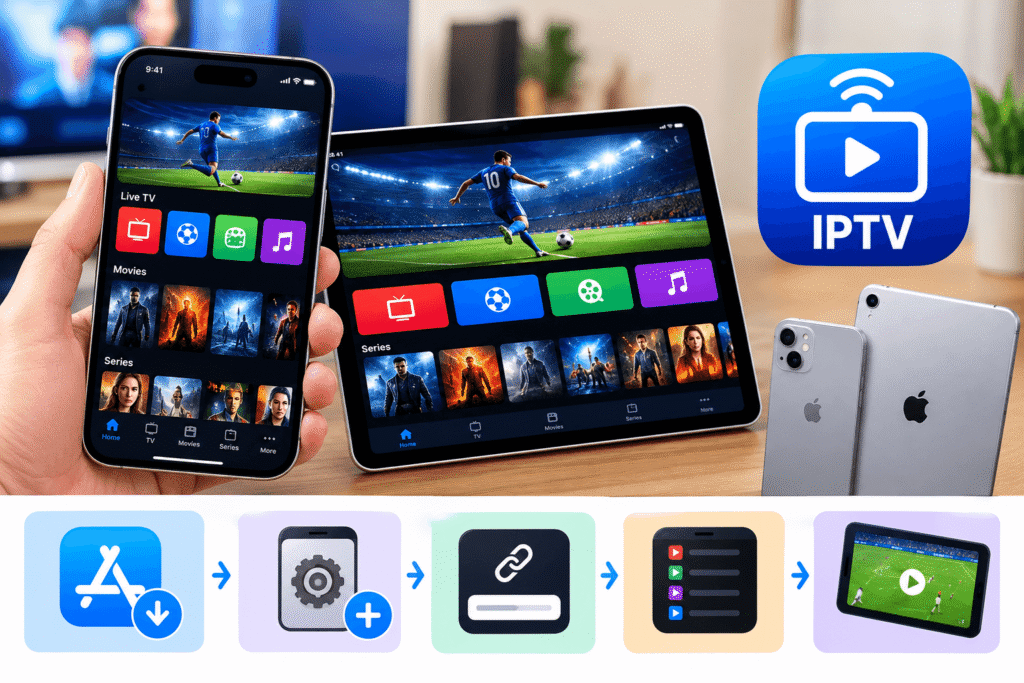
Apple devices have their own application requirements. An app designed for Android will not necessarily work on iOS, so iPhone and iPad users should check compatibility before purchasing a subscription.
Step-by-step setup for iOS
Follow these general steps when setting up a legitimate streaming service:
- Open the Apple App Store.
- Find the official app or a compatible player recommended by the provider.
- Check its developer, compatibility details and privacy information.
- Download and install the application.
- Sign in or activate your account using the provider’s official instructions.
- Select available content and test playback.
Some services use a username and password, while others use a direct account sign-in. The correct method depends on the application.
If a provider asks you to install an unknown configuration profile, share your Apple Account password or disable important security protections, stop and verify the request before proceeding.
Can you use one subscription on Android and iOS?
Sometimes, but it depends on the provider’s terms.
An IPTV subscription compatible with Android and iOS may allow you to sign in on both operating systems, but this does not necessarily mean that you can stream on both devices simultaneously.
Before buying, ask the provider:
- Can I install the app on both Android and iPhone?
- Can I use the same account on my tablet?
- How many devices can be registered?
- How many streams can run at the same time?
- Are there extra charges for additional devices?
These questions help you choose a plan that fits your household without paying for features you do not need.
Internet Speed and Streaming Quality
Even a suitable application cannot deliver smooth playback if your internet connection is slow or unstable. For UK viewers, broadband speed, Wi-Fi coverage and mobile signal can all affect the experience.
What internet speed do you need?
The following figures are general estimates for one stream. The actual requirements depend on the service, video compression, network conditions and other devices using your connection.
| Video quality | Suggested download speed |
|---|---|
| Standard Definition (SD) | 3–5 Mbps |
| High Definition (HD) | 5–10 Mbps |
| Full HD (1080p) | 10–15 Mbps |
| 4K Ultra HD | 25 Mbps or more |
These figures are useful starting points, not guarantees. A connection with low speed fluctuations and minimal congestion may perform better than a faster but unstable connection.
Wi-Fi or mobile data?
Wi-Fi is often the better choice for longer viewing sessions because it can help you avoid using your mobile data allowance.
Mobile data can be convenient when travelling, but signal strength varies between locations. If you plan to stream regularly over a mobile network, check your data allowance and your mobile provider’s coverage.
To improve playback:
- Move closer to your Wi-Fi router.
- Pause downloads on other devices.
- Close apps that use significant network bandwidth.
- Lower the video quality when your connection is weak.
- Restart your router if other internet services are also slow.
A reliable IPTV subscription compatible with Android and iOS still depends on a stable internet connection, so test the service under the conditions in which you normally watch.
Common IPTV Problems and How to Fix Them
Even legitimate streaming services can experience occasional technical issues. The key is to identify whether the problem comes from your device, connection, application or provider.
The app will not open
Restart your phone or tablet and check for available application updates. On Android, you may also be able to clear the app’s cache through the device settings. On iPhone or iPad, closing and reopening the app may help.
If the problem continues, consult the official app developer or service support team.
Videos keep buffering
Buffering can result from weak Wi-Fi, network congestion, device limitations or problems at the provider’s end.
Try lowering the playback resolution and testing another authorised stream. If multiple apps are buffering, the issue may be your internet connection rather than the IPTV application.
Login details do not work
Check for typing errors, extra spaces and incorrect capitalisation. Confirm that your subscription is active and that you are using the correct login method.
Never share your password or verification codes with strangers who claim they can fix your account.
The picture looks blurry
Check the selected resolution, the source quality and your internet speed. A high-resolution screen cannot improve a low-quality source automatically.
When comparing an IPTV subscription compatible with Android and iOS, look for honest information about supported resolutions instead of relying on claims that every programme is available in 4K.
Security and Privacy Tips for Mobile IPTV
Your phone or tablet may contain personal photographs, emails, payment information and other sensitive data. Protecting it should be part of your streaming setup.
Follow these practical precautions:
- Download apps from official stores or other verified sources recommended by the legitimate provider.
- Review app permissions before granting access.
- Use a strong, unique password for your streaming account.
- Keep your operating system and apps updated.
- Check the provider’s privacy policy and payment terms.
- Avoid websites that demand unnecessary personal details.
- Do not install suspicious files or disable device security features just to access a stream.
Be particularly careful with offers that promise access to every premium sports channel or film library for an unusually low fee. Unclear licensing, missing company details and pressure to pay quickly are reasons to investigate further.
For a safer experience, select an IPTV subscription compatible with Android and iOS from a provider that clearly identifies its business, explains its content rights and provides understandable subscription terms.
Is IPTV Legal in the UK?
IPTV technology is not illegal simply because it delivers television over the internet. Many legitimate broadcasters and streaming platforms use internet-based delivery.
The important question is whether the provider has the necessary rights to distribute the content it offers. A service may be accessible through an Android or iOS app and still lack permission to stream certain programmes, films or sporting events.
Before subscribing, check the provider’s identity, licensing information and terms. Be wary of claims such as “every premium channel worldwide” when no credible information about content rights is available.
For further guidance, consult Ofcom’s information for consumers and the UK government’s official intellectual property resources. If you are unsure about a particular service, research it carefully before making a payment.
Frequently Asked Questions
1. What is the best IPTV subscription compatible with Android and iOS?
The best option is a legitimate service that supports your devices, offers the content you want to watch, provides clear subscription terms and has reliable customer support. Compare compatibility, licensing, picture quality and total cost before choosing.
2. Can I watch IPTV on both Android and iPhone?
Yes, if your chosen service supports both operating systems. An IPTV subscription compatible with Android and iOS may work across different devices, but you should confirm whether one account covers both platforms and whether simultaneous streaming is allowed.
3. Do I need a separate IPTV app?
Not always. Some licensed services provide their own application, while others work with a compatible player. Check the provider’s official setup instructions before installing anything or paying for an additional app.
4. Can I watch IPTV without Wi-Fi?
Yes, some services can stream over mobile data if your device and subscription support it. However, streaming can use a significant amount of data, particularly at HD or 4K quality. Check your mobile allowance and signal strength first.
5. Does IPTV work on older Android phones and iPhones?
It depends on the operating system version, hardware and app requirements. Before choosing an IPTV subscription compatible with Android and iOS, check the minimum supported software version and make sure your device can run the required application.
6. Can I use one subscription on multiple devices?
Some providers allow multiple registered devices, while others restrict access to one device or one stream at a time. Read the subscription terms carefully and confirm any additional charges before purchasing.
7. Is a cheap IPTV subscription always a good deal?
No. A low price does not guarantee reliable streaming, good support or legal access to content. Compare the full cost, cancellation policy, licensing information and device compatibility instead of judging a service by price alone.
Conclusion: Choose the Right Mobile Streaming Setup
Watching television on a phone or tablet can be convenient, especially when you want flexibility at home or while travelling. The best choice depends on your device, internet connection, preferred content and budget.
Before purchasing an IPTV subscription compatible with Android and iOS, check app compatibility, content licensing, subscription limits, customer support and payment terms. Test your internet connection, protect your account details and avoid providers that make unrealistic promises.
Ready to choose your streaming service? Compare legitimate providers, check their official device requirements and read their terms carefully before subscribing. A little research now can help you avoid unexpected costs and enjoy a smoother viewing experience.